
⚡ A fast, tiny package manager for the npm registry, written in TypeScript.
- 🟦 Pure JS: built with TypeScript and Node.js builtins.
- 🪶 Small: about 320 kB on disk (107 kB packed), small enough to bundle into your own tools.
- 🚀 Fast: install speed on par with package managers written in Rust.
- 🧩 Programmable: every command is also a JavaScript function you can import.
- 🎯 Simple: no new config files or conventions. Your existing
.npmrcjust works. - 🔒 Secure: defaults to a 1-day minimum release age and skips dependency lifecycle scripts.
- 📦 Lockfile compatibility: supports existing
package-lock.json,pnpm-lock.yamlandbun.lockout of the box.
🤔 Why another package manager?
There are already several popular package managers:
- npm ships with Node.js, but it is simply slow.
- pnpm is fast and well designed, but it keeps growing in size, features and customization settings.
- Yarn (berry) has become complex, with its own concepts and unusual requirements.
- Bun, Deno and Nub are fast, but they fit best when you also use them as runtime and not Node.js.
Furthermore:
- 🟢 Node.js is capable. It already has worker threads, zlib, fetch and every other needed feature.
- 🦀 Native package managers are much larger to download and store on disk, for every version. In CI, just fetching the binary, even from a cache, can cost more time than it could save! Most of the bytes in these binaries are already native features that Node.js already has. In our benchmarks, pnpm 12 takes 59.8 MB and aube 44.5 MB on disk; upm ~320 kB.
- 🔌 Programmatic API. The only possible way to install dependencies is spawing command in a separate process. None of the current package managers are small enough to bundle and embed into another library.
💡 upm started as an experiment: how fast and small can an npm client be in pure TypeScript, making the most of what Node.js already provides? And answer turned out to be possbile!
Get started
Install upm globally. The scripts check for Node.js 22.3+, then install upm with npm.
# macOS / Linux
curl -fsSL https://upm.sh/install.sh | sh

# Windows (PowerShell)
irm https://upm.sh/install.ps1 | iex

# npm
npm i -g upm --min-release-age 0
Then install your project's dependencies:
upm iImportant
Prerelease: upm is not stable yet see current limits.
Quick reference
upm install                          # install the project's dependencies (also upm alone)
upm add vue@^3 nanoid                 # save to package.json, then install
upm add --dev vitest                  # save as a dev dependency
upm add --optional fsevents           # save as an optional dependency
upm add --exact nanoid                # save the selected version without a caret
upm remove nanoid                     # remove from package.json, then install
upm add shared -w app                 # add a dependency to workspace app
upm run                              # list project scripts
upm run build                        # run the project's build script
upm run --workspaces build           # build workspaces in dependency order
upx cowsay hello                     # run a package's command, installing it if needed
upm dedupe                           # reduce duplicate versions already locked
upm install --production             # skip packages used only by dev dependencies
upm install --frozen-lockfile        # CI: fail if the lockfile is missing or stale
upm install --verify                 # check file hashes and links, repair damage
upm install --offline                # no network: install from upm.lock and the store
upm lock                             # write upm.lock without installing packages
upm resolve vue@^3                   # show which registry version matches
upm fetch nanoid                     # cache this package, without its dependencies
upm fetch --lock                     # cache this platform's locked packages
upm prune                            # clean up old entries and unreferenced files
Commit upm.lock with your package.json. When switching to upm, delete the old
node_modules first. Otherwise, your code may still import old packages.
Use --dir <path> to choose a project directory. Otherwise, install commands look
for the nearest package.json above the current directory, or the workspace root
that lists it. --dir uses the directory you give it; for a workspace tree, point
it at the root and use -w where supported.
Most commands support --json for machine-readable results. Progress and warnings
go to stderr. upm lock --json prints the lockfile without writing it.
See upm --help for all options, including experimental worker settings.
Add and remove packages
upm add vue@^3 nanoid
upm add --dev vitest                  # -D also works
upm add --optional fsevents           # -O also works
upm add --exact nanoid                # -E also works
upm add sw@npm:string-width@^4        # install string-width under the name sw
upm remove nanoid
upm alone and upm i are short for upm install, and upm install <spec>... is another way to write
upm add <spec>....
- By default,
addsaves todependencies. Use--devor--optionalfor the other groups. Adding a package already in another group moves it. - An explicit version or range is saved as written:
vue@^3saves^3. - A bare name,
*, or a tag such aslatestsaves a caret range of the selected version.--exactsaves that version without the caret. It does not change an explicit range you supplied. removetakes a name out of all three dependency groups. It fails if the name is not a dependency.- Unrelated dependencies keep their locked versions after an add or remove.
There is no update command yet. Use add with a new version or range to change a
package. dedupe is not an update command: it prefers already-locked versions.
To choose fresh versions for the whole project, remove upm.lock and node_modules,
then install again. This can change any version allowed by package.json.
Install from a tarball
upm add ./vendor/lib-1.0.0.tgz        # saves "lib": "file:vendor/lib-1.0.0.tgz"
upm add https://example.com/lib-1.0.0.tgz
upm add other@https://example.com/lib-1.0.0.tgz
A dependency can be an http:// or https:// URL of a tarball, or a path to a .tgz,
.tar.gz or .tar file, written file:vendor/lib.tgz, ./vendor/lib.tgz or
../lib.tgz. Given without a name, add uses the name in the tarball's
package.json. In package.json, a path is relative to that file, so only the root
and workspaces can use one; add reads a path from the current directory and saves it
that way. Absolute paths are refused because they would not work on another machine.
To use a directory, make it a workspace, pack it, or link it (below).
A tarball is read when it is first locked. upm.lock keys it by its URL or
root-relative path and records the integrity of its bytes. Its own dependencies come
from the registry.
A local tarball is part of the project, like package.json: when you replace it (say,
after npm pack again), the next install reads it again and locks the new bytes,
leaving the rest of the tree as it was. Each install checks the file's size and times
first and hashes it only when they change. --frozen-lockfile fails instead, as the
lockfile is out of date. A URL is not read again: the lockfile pins its bytes, and an
install that has to fetch it fails with EINTEGRITY if the server now sends others. To
take a new version, point the dependency at a new URL, or remove it and add it again.
Credentials in .npmrc are sent to a URL on the same host, as for a registry.
Link a directory
upm add lib@link:../lib # saves "lib": "link:../lib"link:<path> works as it does in pnpm and yarn. It symlinks the directory into
node_modules as it is and links its bins. None of its own dependencies are installed.
The path is relative to the package.json that declares it, so only the root and
workspaces can use one. It may lead outside the project. upm.lock keeps only the link.
Its bins come from the directory's package.json, read again whenever that file changes.
A link to a directory that does not exist is made anyway, with a warning. It is never used
as another package's peer dependency. bun's link:<name> (a package registered with
bun link) is not supported.
Install from git
upm add github:unjs/ufo#v1.5.4         # also unjs/ufo#v1.5.4
upm add git+https://github.com/unjs/ufo.git#3f1c0a2
upm add gitlab:group/sub/repo#main
upm does not run git. A git dependency on GitHub, GitLab or Bitbucket is installed from
the host's archive of its ref, the way a tarball URL is: upm.lock keys it by that
archive URL and pins its bytes. package.json keeps the spec as written. These forms
work: github:, gitlab: and bitbucket: shortcuts, user/repo for GitHub,
git://, git+https://, git+ssh://, git@host:user/repo and https:// URLs of those
hosts ending in .git. The ref after # is a commit, branch or tag, and HEAD when left
out. A package's own git dependencies install the same way.
Other hosts, #semver: ranges and ::path: subdirectories are refused, as they need a
clone. Credentials in a git URL are dropped, so private repositories do not work.
It holds the whole repository, not what npm pack would pick. prepare and other scripts
are not run, so a repository that only ships sources (no built files committed) installs
but may not load. A branch or HEAD moves:
a fresh machine that fetches it after a push fails with EINTEGRITY, so pin a tag or
commit.
Override dependencies
{
  "overrides": { "minimatch": "^9.0.5", "eslint": { "ajv": "6.12.6" }, "react": "$react" },
  "resolutions": { "**/semver": "7.6.3", "jest/chalk": "4.1.2" },
  "pnpm": { "overrides": { "glob@<9": "9.3.5", "request>form-data": "-" } }
}
upm reads npm's overrides, yarn's resolutions and pnpm's pnpm.overrides from the
root package.json, and the overrides of pnpm-workspace.yaml, where pnpm 10 and later
keep them:
overrides:
  "semver@>=7.0.0 <7.5.2": 7.5.2
  "request>form-data": "-"
It changes dependencies across the whole tree to match: those of the root, of each workspace and of every installed package.
namereplaces every dependency on that package.name@rangereplaces only those whose declared range overlaps it, as npm and pnpm match:semver@<7.5.2replaces^7.0.0even where that would install 7.6.- A rule scoped to a parent (
"eslint": { "ajv": … },jest/chalk,request>form-data) changes only that parent's own dependencies. The parent can be a workspace, by its name. A version range can follow the parent's name too (eslint@^8). - The value can be a range, a version, a tag, an alias (
npm:other@^1), a tarball URL, a git spec on a supported host or afile:path from the root.$namemeans the range the root declares forname.-removes the dependency. - Peer ranges of installed packages are overridden too. This lets a plugin share the version the root chose.
- npm refuses an override that conflicts with one of the root's own dependencies. upm applies it, as pnpm, yarn and bun do.
upm.lock records the overrides. When they change, the next install resolves the
affected dependencies again and keeps the rest of the tree. --frozen-lockfile fails
instead.
A package has one set of dependencies in the tree, so a rule nested deeper than one
parent ("a": { "b": { "c": … } }, a/**/c, a>b>c) is not applied. upm warns about
it; pnpm refuses a>b>c. Workspaces' overrides, catalog: values and the rest of
pnpm-workspace.yaml are not read.
Performance
upm aims to make cached and repeat installs cheap by reusing files and saved install state. Actual times depend on the package tree, network, filesystem, and available CPU.
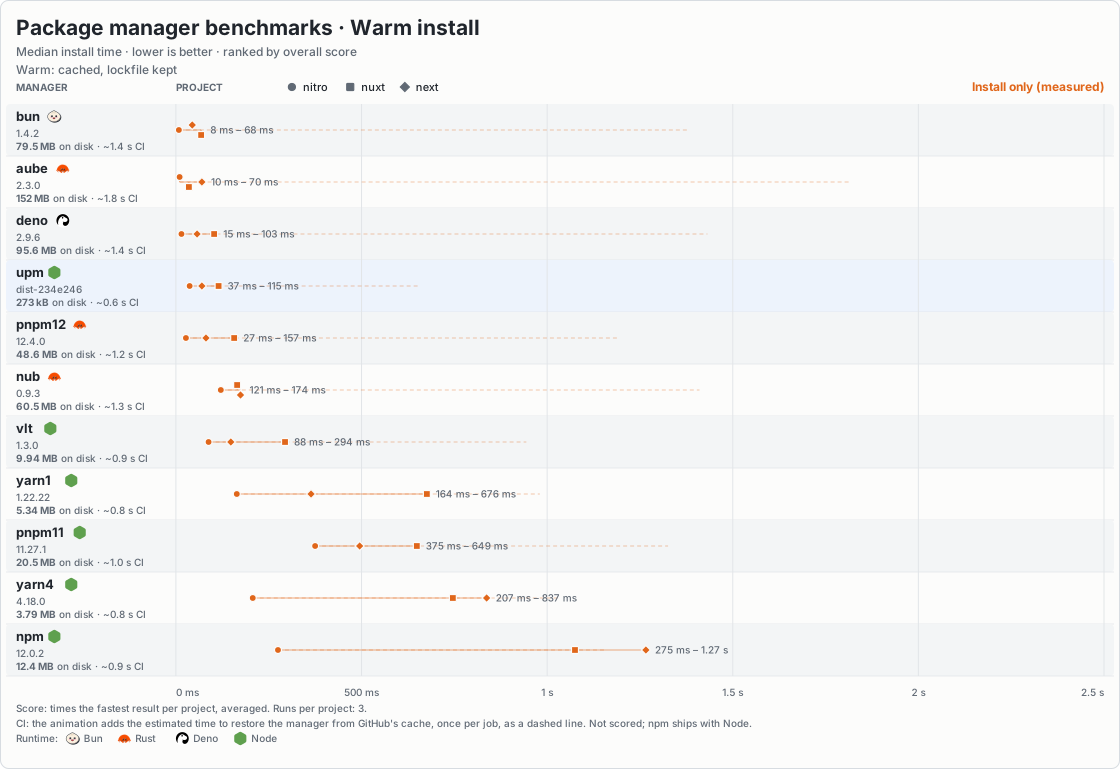
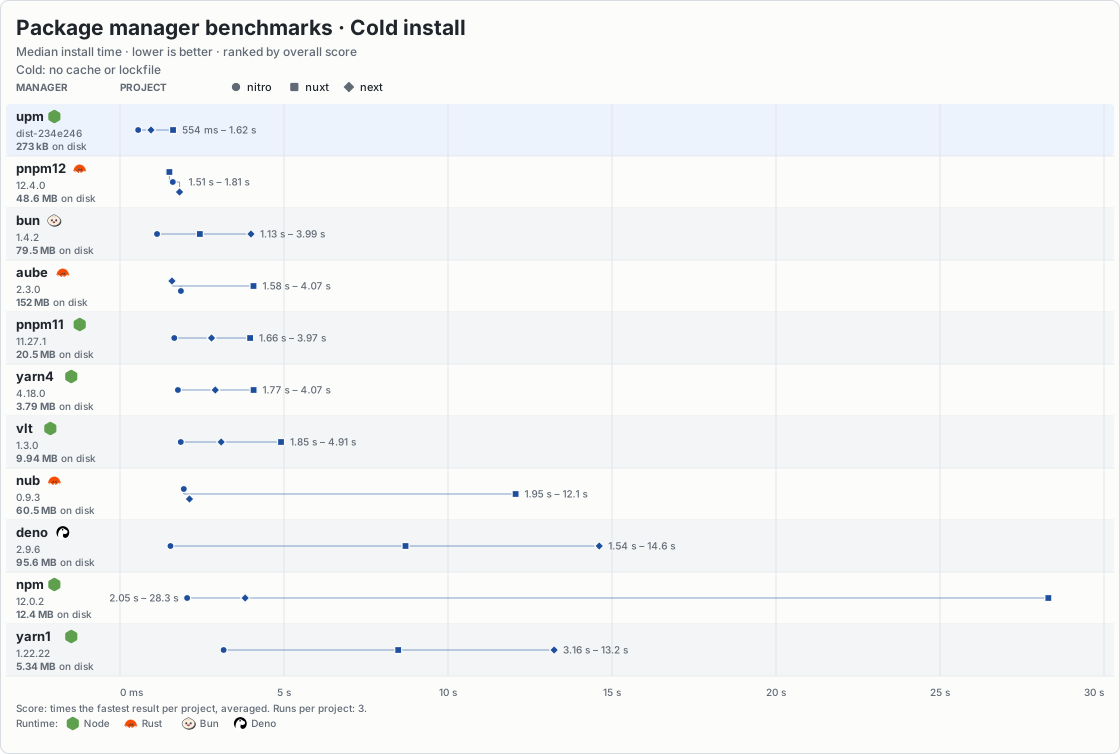
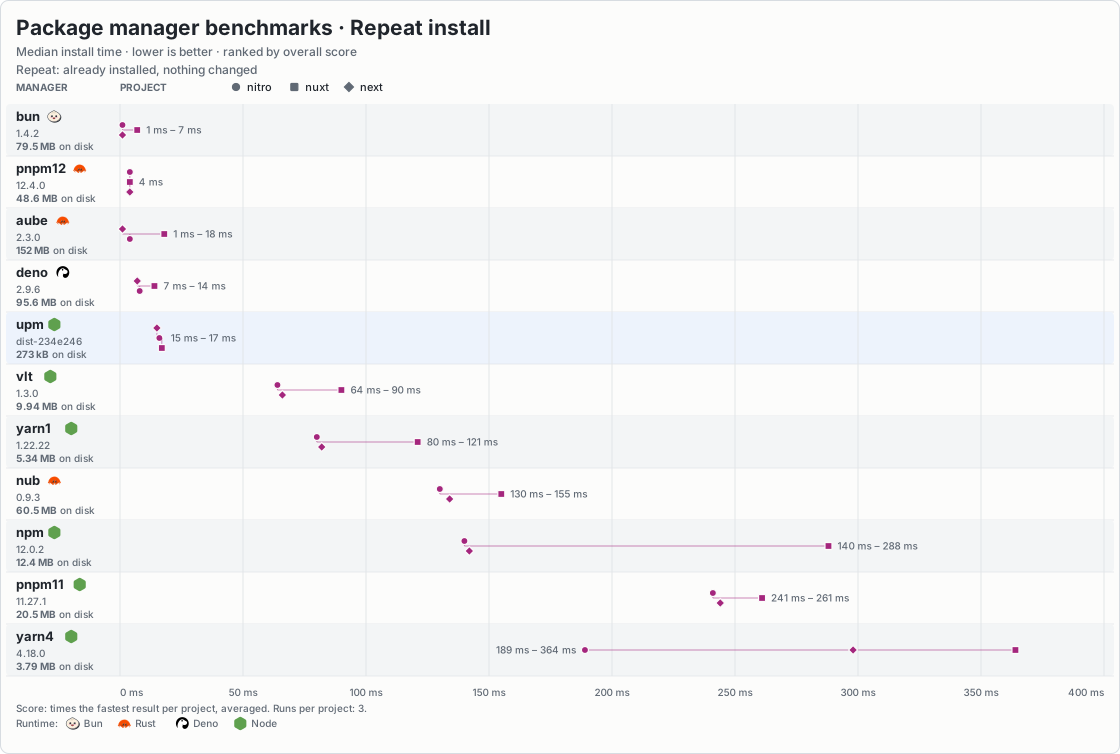
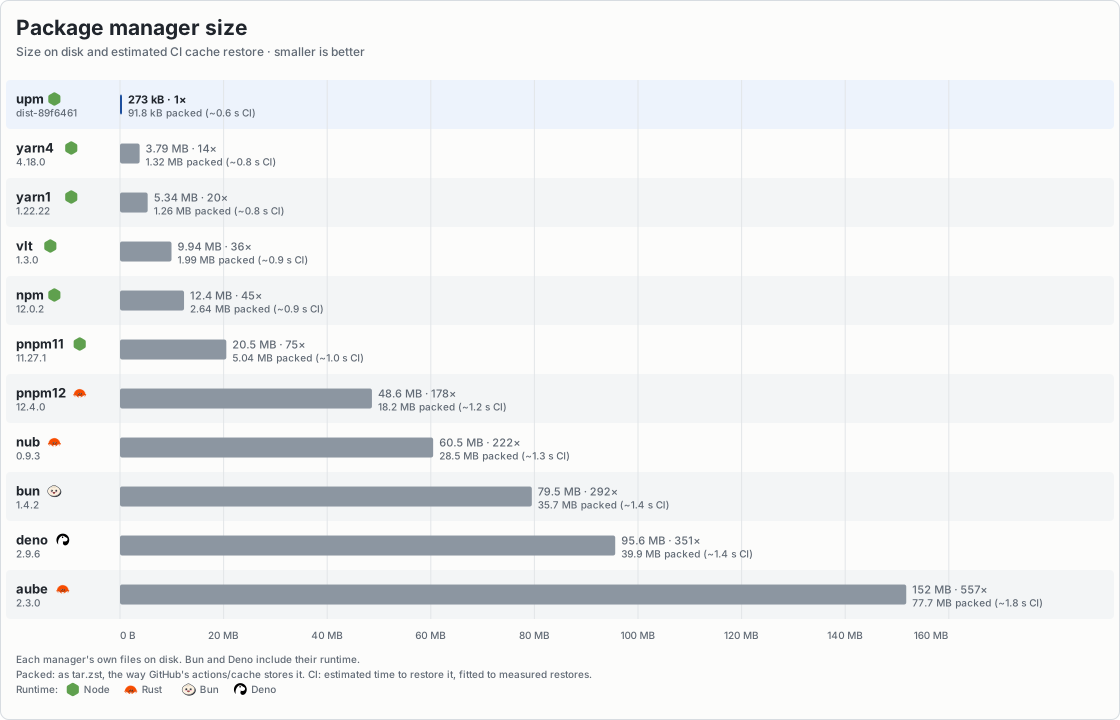
Other charts: Peak memory (cold, warm, repeat). CPU time (cold, warm, repeat).
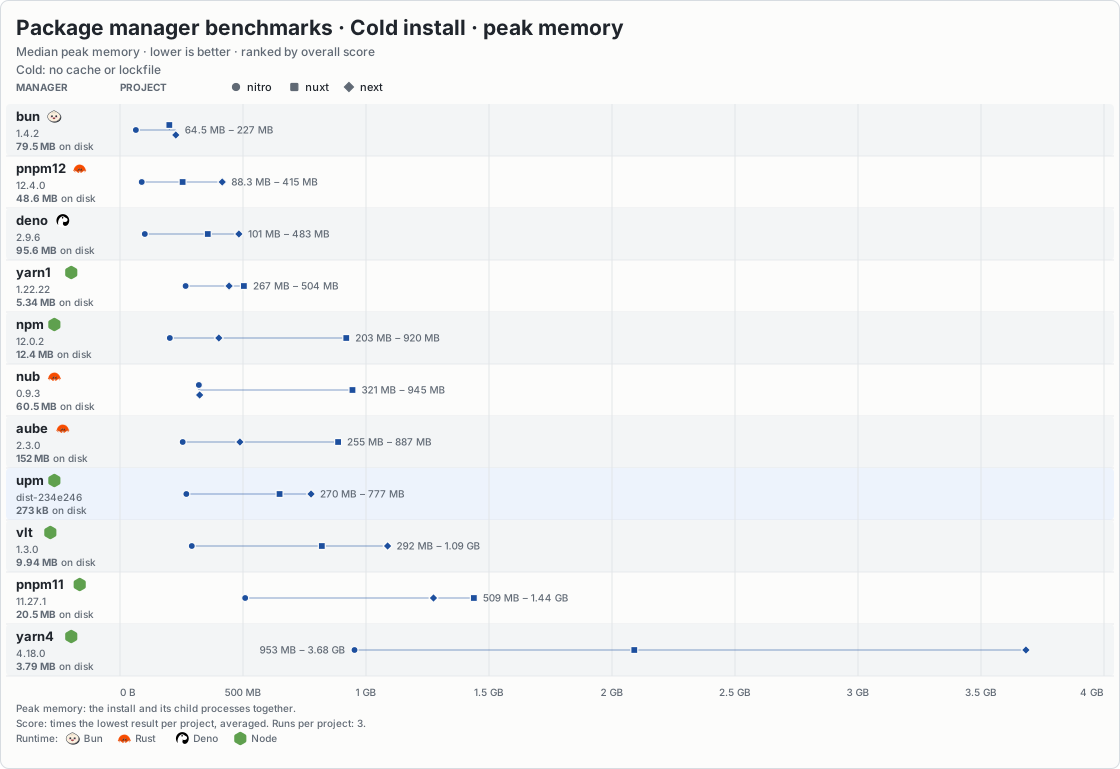
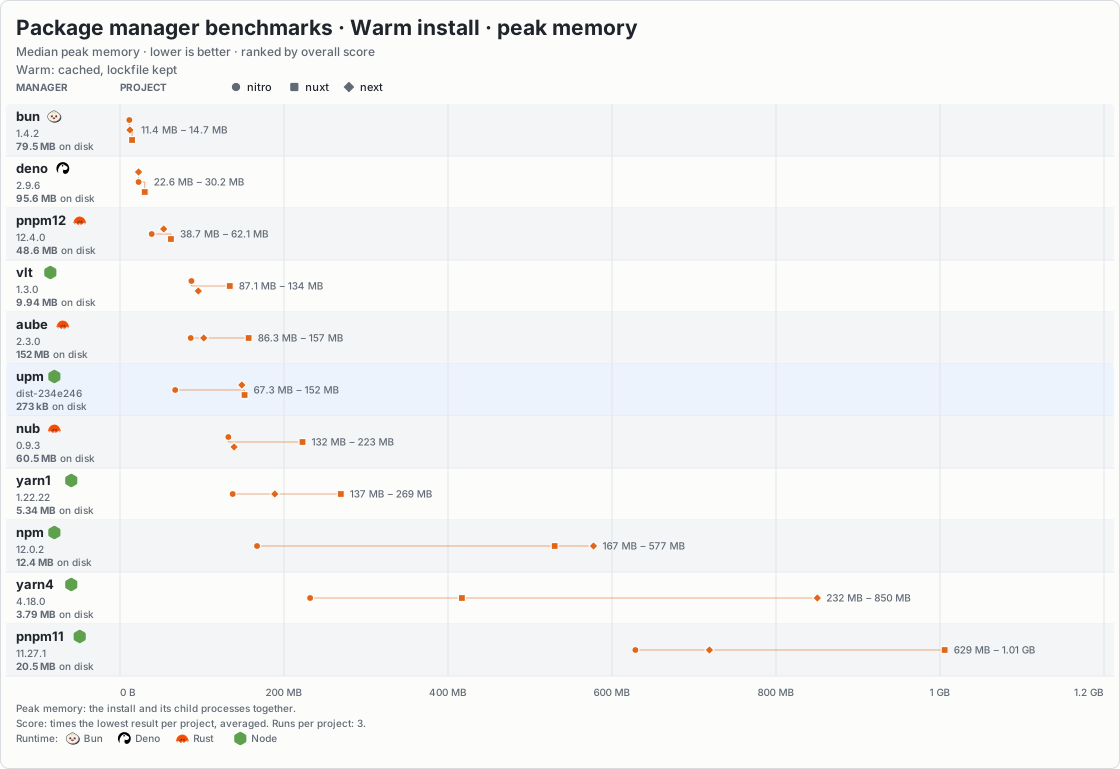
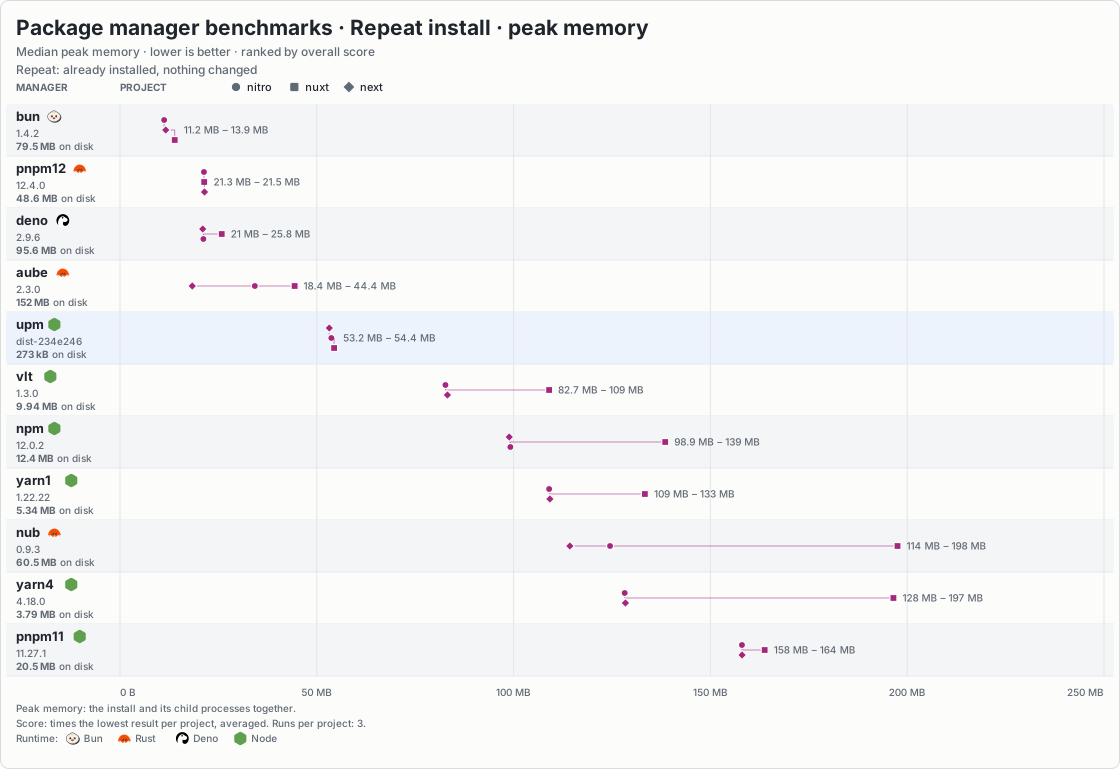
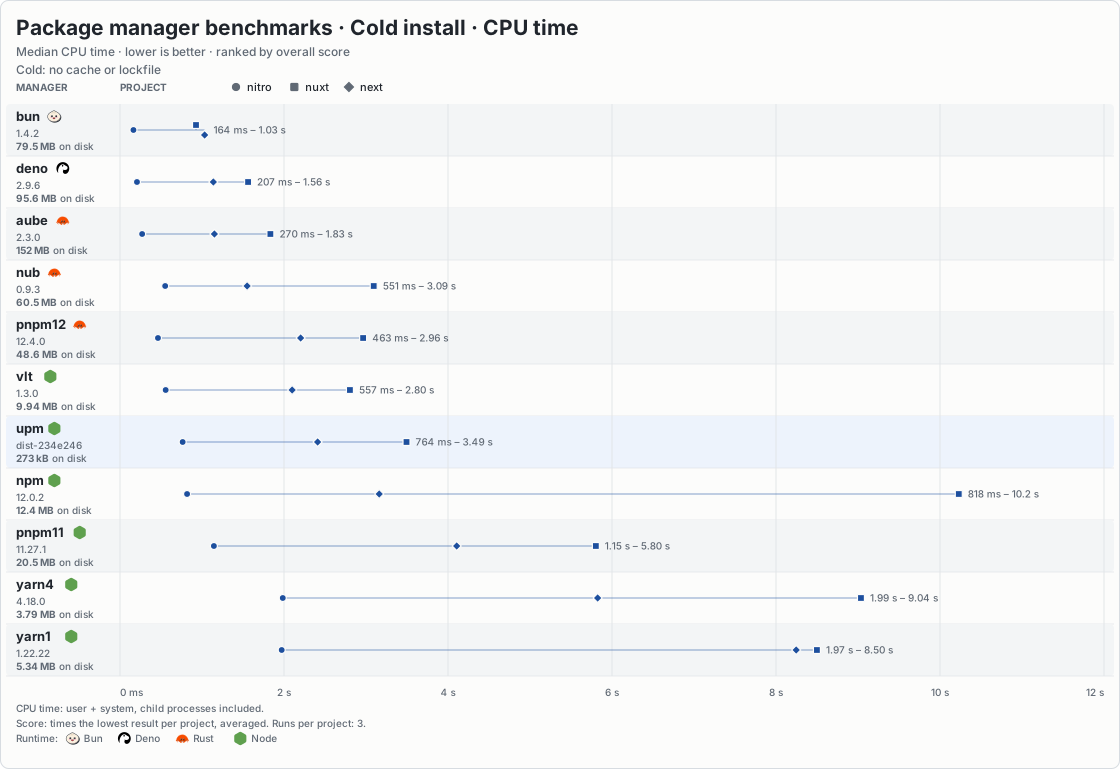
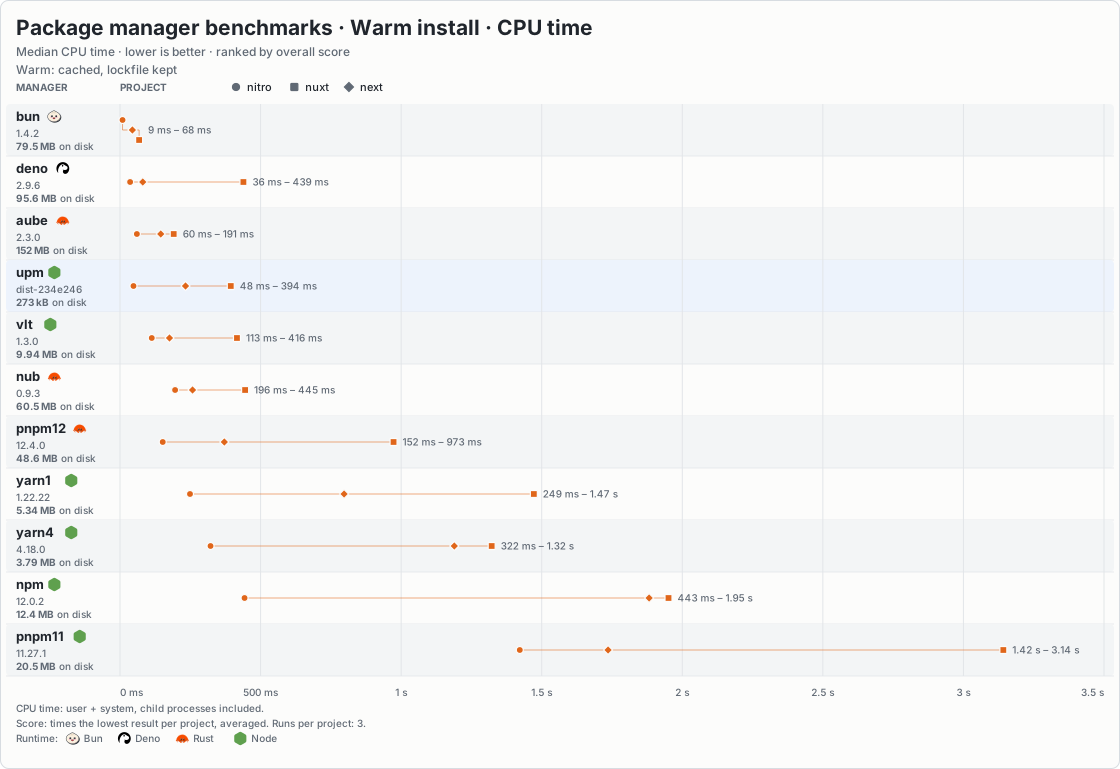
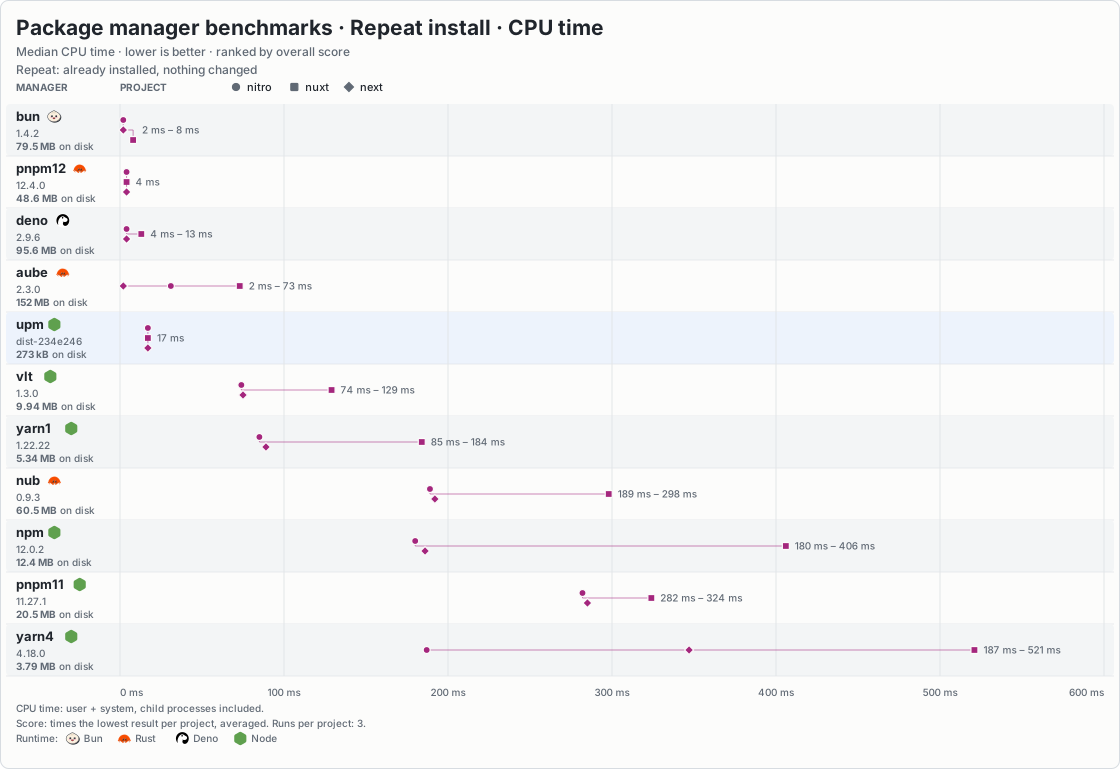
The benchmark guide explains how to compare cold, warm, and repeat installs with other package managers. It uses private caches and disables lifecycle scripts for a fairer comparison.
JavaScript API
The commands are also available as functions from upm:
import { add, install, lock, resolve, run } from "upm";

// Install from the lockfile, failing if it is out of date
const result = await install({
  dir: "./my-project",
  frozen: true,
  log: (message, level) => console.error(`[${level}] ${message}`),
}); // { packages: 120, workspaces: 0, upToDate: false, stats, ... }

// Add a dependency to package.json and install it
await add(["vue@^3"], {
  dir: "./my-project",
  group: "dependencies",
}); // { added: [{ name: "vue", range: "^3", group: "dependencies" }], ... }

// Resolve a spec to a version without installing
const [vue] = await resolve(["vue@^3"]); // { name: "vue", version: "3.5.13", dist, ... }

// Build the lockfile in memory without writing it
const lockfile = await lock({ dir: "./my-project", write: false }); // { root, packages, ... }

// Run the build script in every workspace
const { code, results } = await run("build", {
  dir: "./my-project",
  workspaces: "all",
  install: true, // install the tree first, as `upm run` does
}); // { code: 0, results: [{ name: "app", path, file, code: 0 }] }

// Other exports
import {
  dedupe, // re-resolve, preferring locked versions, then install
  exec, // run a package's bin, installing it if needed
  fetchLockfile, // fill the store from the lockfile, no linking
  fetchPackages, // resolve specs and fill the store, no linking
  listScripts, // list package.json scripts
  prune, // drop unused store and project entries
  remove, // remove dependencies, then install
} from "upm";

// Experimental resolver API (works in browser too)
import {
  createRegistry, // registry client that fetches packuments
  formatLockfile, // lockfile object to text
  fromLockfile, // lockfile object to resolution
  parseLockfile, // lockfile text to object
  parseSpec, // parse a spec such as "vue@^3"
  resolveTree, // resolve a dependency tree
  toLockfile, // resolution to lockfile object
} from "upm/resolver";
Functions return data and do not print their own messages. Use log for progress,
warnings, and debug messages, and onProgress (install, add, remove, dedupe, lock) for
counts to draw a progress bar from. run and exec still share the child's
terminal input and output.
Errors have a code you can handle. The exported ErrorCode type lists common
codes; filesystem and worker errors may have others. Options under experimental
and the diagnostic InstallStats fields may change in any release. See
src/api.ts for options and result types.
The main upm entry needs Node.js. Its worker threads start from code inside it, not from
separate files, so it can be bundled into your app; when no thread can start, it works on one
thread and warns through log. The experimental upm/resolver entry provides
the registry client, dependency resolver, and in-memory lockfile tools without
requiring Node. It does not install files or read .npmrc for you. See
src/resolver.ts for its exports.
Store backend
storeBackend puts shared storage behind the store: a team cache, a key-value database, the
browser's OPFS. upm asks it for a package before downloading one, and hands it each package it
downloads before the command returns. The store is still a real directory that projects link
from.
A backend holds bytes by key; upm decides the keys and what they hold:
import { install } from "upm";

const data = new Map();

await install({
  storeBackend: {
    get: async (key) => data.get(key),
    set: async (key, value) => void data.set(key, value),
  },
});
Keys are /-separated and safe as file names, and a key's value never changes. An optional
getMany(keys) reads several in one call. Without set, the backend is only read. Packages
downloaded with credentials are not handed to it unless it says it is private.
A backend must be trusted as the store is: it decides what a package holds. Its files are
checked against their hashes unless it says it is trusted, and its paths must stay inside the
package. A failure or a call quiet for 30 s counts as a miss, and upm downloads instead. See
StoreBackend in src/store-backend.ts.
Lockfiles and CI
upm install --frozen-lockfile
upm install --production --frozen-lockfile
upm ci --omit=dev                    # the same, in npm's words
--frozen-lockfile fails if upm.lock is missing, invalid, or out of date with the
project. It does not select versions or rewrite the lockfile. Missing cached
packages still need to be downloaded, so this is not an offline mode.
An install that links node_modules from upm.lock leaves a copy of it in
node_modules/.upm.lock, as npm and pnpm keep one. When upm.lock is missing and that
copy still matches package.json, upm install (and dedupe) writes it back and goes on
from it: a tree that is already installed is then up to date without the store or the
network. If package.json has changed, the copy is ignored and the install resolves as if
there were no node_modules. upm lock and --frozen-lockfile never read the copy.
Registry documents that upm reads while resolving are kept in the store's metadata
directory (the home store's, unless a store is set), under paths named after the registry and package
(metadata/registry.npmjs.org/@scope/name/), so deleting a directory forgets those
documents. A full document is kept cut down to the fields upm reads, and each notes where its
versions are, so a pick parses only the versions it looks at. A kept document is used
without a request within the max-age the registry sent (five minutes on npmjs), and, while
min-release-age is on, for as long as it was fetched after the cutoff: any version it lacks
is too new to pick. After that, upm asks with its ETag and reuses it on a 304. A tag
written out, such as upm exec foo@latest, is always asked about. When a document used
without asking cannot satisfy a range or pin, upm asks the registry once. A kept document
that is damaged, such as cut short or no longer valid JSON, is treated as missing: upm asks
the registry for it again, or fails with EOFFLINE under --offline.
--offline never uses the network. An install from a current lockfile works when the
store already holds its packages, which a past install on the same machine leaves there.
A new version is picked from kept documents, however old. Anything else that needs the
registry or a download fails at once with EOFFLINE, including a missing optional package.
--prefer-offline also picks from kept documents however old, and asks the registry only
for a name with no kept document, or one whose kept document cannot satisfy the range.
Tags such as latest may then be out of date.
--production skips packages used only by devDependencies. It uses the same
lockfile as a development install; it does not create a smaller lockfile.
The lockfile keeps optional builds for all platforms. At install time, upm uses the current OS, CPU, and libc to select the right builds. For example, on Linux it distinguishes glibc from musl builds of native packages. The lockfile is designed to be shared across machines, but that does not mean the installer is fully tested on every platform. Incomplete registry metadata can also hide some libc-only restrictions.
You can prepare the cache separately:
upm lock
upm fetch --lock
# Or fetch only production packages:
upm fetch --lock --production
fetch --lock reads an existing lockfile; it does not refresh it or check it
against package.json. It fetches packages for the current platform only.
Other package managers' lockfiles
If there is no upm.lock, upm can install the versions listed in
package-lock.json, pnpm-lock.yaml or bun.lock. It leaves that file unchanged
and does not create an upm.lock.
When using another manager's lockfile, upm does not support add, remove or
dedupe. Installation also fails if the lockfile no longer matches package.json.
Use the original package manager to update the lockfile, or delete it to let upm
create its own.
upm cannot use these lockfiles if they include workspaces, patches, or git or file
dependencies. bun.lock does not say which packages need glibc or musl, so upm
installs both builds on Linux.
Run scripts
upm run                   # list scripts
upm run build
upm test --watch           # short for upm run test --watch
upm vitest --run           # no vitest script: runs node_modules/.bin/vitest
upm run test -- --watch    # the first -- is optional
upm run --dir ./app build
upm run --if-present lint  # no lint script is not an error
Before a script runs, upm installs the project it belongs to, workspace root and all,
so dependencies are current. When nothing changed this is a quick check, and a tree
installed with --production stays that way. A project that declares no dependencies
and was never installed is left alone.
Scripts run in a shell from the selected package directory. Local
node_modules/.bin directories are added to PATH, so scripts can use installed
command-line tools. Script output goes straight to your terminal.
Put upm's own options before the script name. Everything after the name is
passed to the script. upm <name> without run falls back to an installed bin of
that name when there is no such script; it never installs one. Only the named script runs: upm does not run prebuild,
postbuild, or other pre/post hooks automatically.
Without workspace options, run uses the package.json in the current directory,
or in --dir. Unlike install, it does not search parent directories.
By design, upm does not run dependency lifecycle scripts during installation. Packages that rely on install or postinstall scripts to build or download files may need extra setup.
Run package commands
upx vitest --watch                    # the project's vitest when installed
upx cowsay@1.6.0 hello                # an exact version, installed once
upx -p typescript@5 tsc --version     # install packages, then run any command
upx -p eslint -p prettier -c 'eslint . && prettier --check .'
upm exec eslint .                     # upx is short for upm exec
upx runs a package's command from the current directory, or --dir. As with
npm, a command in the nearest package.json's own bin comes first. Next, a name
without a version uses a command or package already in a node_modules above that
directory, and a version or range uses an installed package that matches it. A tag
such as @latest always asks the registry.
Otherwise upm installs the package into its own project, linked from the shared
store: under node_modules/.upm/.exec of the project root, so it is removed with that
node_modules and can import what the project installed, or under exec in upm's
cache directory when the root has no node_modules. It runs the package's only command (or one file
with several names), or the one named after the package. Use -p when a package has
several commands or when the command has another name. A tag or range asks the
registry for the newest match each time; each set of versions is installed once.
-c '<command line>' runs a whole line in the shell instead, so &&, pipes and
variables work. The -p packages are installed first and on PATH; without -p,
only the local node_modules/.bin directories are, and nothing is installed.
Put upm's own options before the command; everything after it is passed to the
command. The current project's .npmrc chooses the registry and credentials. There
is no prompt before installing (-y is accepted and does nothing), and packages run
no install scripts.
npm commands
upm login
upm version minor
upm publish --tag next                # upm exec npm publish --tag next
npm's commands for the registry, your account and package.json run npm itself,
exactly as upm exec npm <command>: the project's own npm when installed, otherwise
the latest from the registry. They are access, config, create, deprecate,
dist-tag, info, init, login, logout, org, owner, pack, ping, pkg,
profile, publish, search, show, stage, team, token, trust,
undeprecate, unpublish, version, view and whoami. Only --dir goes before
the command; everything after it is npm's. Use upm run <name> for a script with one
of these names. They run with npm's workspaces-update off, so version and init
in a workspace never let npm install the tree.
npm reads the same .npmrc files, so upm login stores a token upm uses too.
Commands that read or change the installed tree, such as ls, outdated, audit
or update, are not passed on: npm does not understand upm's node_modules
layout or upm.lock.
npm's command lines
Most npm install and run lines work as they are:
upm ciisupm install --frozen-lockfile.uninstall,rm,randunareremove;run-scriptisrun;tandtstareupm run test.--save-dev,--save-optionaland--save-exactare-D,-Oand-E.--omit=devis--production, and--include=devundoes either.--prefix <dir>and-C <dir>are--dir.-s,--silent,-q,--quietand--loglevelset tosilent,errororwarnhide progress, the script banner and the install summary. Warnings and errors stay.--no-progresshides the progress bar. It is drawn on stderr only on a terminal, never whenCIis set. Windows Terminal, ConEmu, Ghostty, WezTerm and VS Code also show it on their tab or taskbar.- These are accepted and do nothing, since upm already works this way:
-S,--save,-P,--save-prod,--ignore-scripts,--no-audit,--no-fund,--legacy-peer-depsand--force.
Flags still go before the script name: npm run build --if-present hands
--if-present to npm, but upm run build --if-present passes it to the script.
Write upm run --if-present build.
Workspaces
A workspace is a local package in a shared project. Declare workspaces in the
root package.json:
{
  "private": true,
  "workspaces": ["packages/*", "!packages/legacy"]
}
The { "workspaces": { "packages": [...] } } form also works. Each matching
folder with a package.json becomes a workspace, except a node_modules folder
and anything in one. Names must be unique; if a package has no name, upm uses its
folder name. Patterns must stay inside the project root.
Link local packages
A workspace can depend on another by name:
{
  "name": "app",
  "dependencies": {
    "shared": "workspace:*"
  }
}workspace:*, workspace:^, and workspace:~ always use the local workspace.
workspace:<range> also checks that its version matches. A missing or mismatched
workspace is an error, not a reason to download a registry package.
A normal range such as "shared": "^1.2.0" uses the workspace when its version
matches. Otherwise, upm uses the registry and reports the mismatch. Only the root
and other workspaces can link to a workspace; dependencies of registry packages
still come from the registry.
Work with a monorepo
upm add shared -w app                     # save a caret range of shared's local version
upm add 'shared@workspace:*' -w app       # require the local workspace
upm add --dev vitest -w app
upm remove vitest -w app
upm run -w app build
upm run --workspaces --if-present build
upm run --workspaces --include-workspace-root buildinstall,lock,dedupe, andprunework on the whole tree from its root, even when started inside a workspace. There is no filteredinstall -w.addandremoveedit onepackage.json: the workspace chosen with-w, the workspace you are in, or the root otherwise. They then install the whole tree.-waccepts a workspace name, a path from the root or current directory, or a directory containing workspaces. You can repeat it forrun. Foraddandremove, the selection must contain exactly one workspace.run --workspacesruns all workspaces, not the root. Selected workspaces run one at a time, after the selected workspaces they depend on. Cycles are reported and run in declaration order.- A failed workspace script does not stop the others. The command exits with the
first failure's code.
--if-presentskips missing scripts;--include-workspace-rootruns the root's script first. Both options work withrun -wandrun --workspaces. - Only the root's
.npmrcis used for the workspace tree.
The root has one node_modules/.upm for registry packages. Each workspace has
its own dependency links and .bin directory. The root only gets a link to a
workspace if it declares that dependency. Workspace paths and links are recorded
in upm.lock. Workspace or node_modules symlinks that lead outside the project
are refused during installation.
upm publish and upm pack are npm's, which keeps workspace: ranges as written. To
publish a package with them, use a tool that rewrites them, such as pnpm, Yarn, or Bun.
Registries and configuration
upm uses the public npm registry by default. Configure a private registry or scope
in .npmrc:
registry=https://npm.example.com/
@acme:registry=https://npm.example.com/acme/
//npm.example.com/:_authToken=${NPM_TOKEN}
save-exact=true
Set NPM_TOKEN in your environment rather than committing a token.
Settings are read in this order, with later values taking priority:
- Global npm config:
<prefix>/etc/npmrc. - User config:
~/.npmrc. - Project config:
.npmrcat the project root. - Environment variables such as
npm_config_registryandnpm_config_save_exact. - The
--registry <url>option, for the default registry only, and--min-release-age <days>,--before <date>,--min-release-age-exclude <glob>,--offlineand--prefer-offline.
A scope's registry still takes priority for packages in that scope, even with
--registry.
Supported settings
An environment variable overrides every .npmrc file. An empty cell means the
setting has no form there.
.npmrc key |
Environment variable | Description |
|---|---|---|
registry |
npm_config_registry, then UPM_REGISTRY |
Default registry. Defaults to https://registry.npmjs.org/. |
@scope:registry |
Registry for packages in @scope. |
|
//host/path/:_authToken |
Token sent as Bearer to URLs under //host/path/. |
|
//host/path/:_auth |
Base64 user:password sent as Basic to URLs under //host/path/. |
|
//host/path/:username with //host/path/:_password |
Basic auth. _password is base64-encoded. |
|
save-exact |
npm_config_save_exact |
true makes add save the exact version instead of a ^ range. |
min-release-age |
npm_config_min_release_age |
Minimum age in days of newly picked versions. Defaults to 1; 0 turns it off. |
before |
npm_config_before |
Only pick versions published on or before this date. |
min-release-age-exclude |
npm_config_min_release_age_exclude |
Package names or globs never held back by release age. A key[]= list or a comma-separated value. |
offline |
npm_config_offline |
true never uses the network, as --offline. |
prefer-offline |
npm_config_prefer_offline |
true picks from kept registry documents without revalidating them, as --prefer-offline. |
hoist |
npm_config_hoist |
false leaves out node_modules/.upm/node_modules, so packages see only what they declare. |
npm_config_userconfig |
Path of the user config file, instead of ~/.npmrc. |
|
globalconfig (user config only) |
npm_config_globalconfig |
Path of the global config file. |
prefix (user config only) |
npm_config_prefix, PREFIX |
The global config file is <prefix>/etc/npmrc. |
UPM_STORE |
Shared store directory. Defaults to the home store, else .upm-store on the project's mount; --store wins. |
|
UPM_LINK_POOL |
Same as --experimental-link-pool: off, on or <size>[,<packages>[,<files>]]. |
|
UPM_RESOLVE_POOL |
Experimental: threads that read the registry. off, on or a count up to 16. |
|
UPM_DEBUG |
1 or on prints debug messages to stderr, as --verbose. |
|
UPM_TRACE |
Benchmarks: appends one JSON line per event to this file. | |
UPM_PHASES |
Benchmarks: 1 prints phase timings to stderr at exit. |
|
NODE_DISABLE_COMPILE_CACHE |
1 turns off the compile cache in compile-cache of upm's cache directory. |
|
NO_COLOR, FORCE_COLOR |
Turn colored output off or on. |
Values can use ${VAR} to read an environment variable. ${VAR?} is empty when
VAR is not set; ${VAR} then stays as written.
Credentials in .npmrc must have a //host/path/ prefix. An unscoped token such
as _authToken=... is refused. Credentials apply to both metadata and tarball
requests. They can also be sent to other paths on the same registry host, but not
to another host. If several registries share a host with different credentials,
the first configured registry with a credential covers paths outside their
configured prefixes.
Release age
By default, upm picks only versions published at least one day ago, so a malicious release has time to be found and pulled before it reaches your tree. It uses npm's settings:
min-release-age=7
min-release-age-exclude[]=@acme/*
min-release-age-exclude[]=my-internal-pkgmin-release-age=<days>: the minimum age.0turns the check off.before=<date>: only versions published on or before this date. In the same file it takes priority overmin-release-age; a later config source overrides either one.min-release-age-exclude: package names or globs (*,**,?) that are never held back. Their own dependencies still are. A comma-separated value also works.
A tag such as latest that points to a version that is too new falls back to the
highest version at or below it that is old enough. A range with no version old
enough fails, and the error names the cutoff. The check applies only to new picks:
versions already in upm.lock and exact versions such as 1.2.3 are kept as
written. To check a package's age, upm reads the full registry document only when
the package changed after the cutoff. A registry that gives no publish dates cannot be
checked; upm warns once for it and picks as if the check were off.
For standard registry tarball URLs, upm.lock leaves out the registry address and
uses the installing machine's config. This lets you change mirrors without
rewriting the lockfile. Nonstandard tarball URLs are kept as written, and an install
warns about any on a host other than the configured registries and npmjs.
Other npm settings, including proxy and certificate options, are not supported.
There is no upm login or upm config set.
How it works
upm shares cached files between projects instead of downloading and copying them again. When nothing has changed, a repeat install does very little work.
Your project sees only the dependencies it declares, so a missing one fails right
away instead of working by accident. Packages get one fallback, as they do with pnpm
and bun: node_modules/.upm/node_modules holds one link per package name, so a
package that imports something it forgot to declare still finds it. When a name has
several versions, the one nearest the root wins. Set hoist=false in .npmrc to
turn this off.
The shared file cache, the home store, lives in store of upm's data directory. Change it
with UPM_STORE or --store <path>; the command-line option takes priority.
upm follows the XDG base directories: the store in $XDG_DATA_HOME/upm (default
~/.local/share/upm), and what it can make again, exec installs and the compile cache, in
$XDG_CACHE_HOME/upm (default ~/.cache/upm). On macOS and Windows it uses ~/.upm unless
those variables are set. When ~/.upm/store exists, as an earlier upm made it, upm keeps using
~/.upm (except for a set XDG_CACHE_HOME), so that store stays where it is. Remove ~/.upm
to move to the XDG directories; the next install downloads the packages again.
Files are stored by content and hardlinked into each project's
node_modules/.upm. Hardlinks let projects share the same bytes on disk. A hardlink
cannot cross filesystems or mount points, such as another drive or a container's
bind mount. When the home store cannot reach a project that way and no store is set,
upm uses .upm-store in the topmost directory on the project's mount it can write
to, as pnpm does, and says so once when it creates it. A directory every user can
write to, such as /tmp, or a .upm-store another user owns is passed over. The packages
are downloaded into that store once, so an --offline install there needs them first.
upm falls back to copying when hardlinks are not available at all. upm prune cleans
the store the project uses.
Do not edit installed package files. Cached files are read-only because a write through a shared hardlink can damage the same file in other projects too.
Storage and repair
To check an installation instead of trusting its saved state:
upm install --verifyThis hashes every installed and stored file, checks package links and command-line
tool links, and repairs problems it detects. It also warns about unmet peer dependency
ranges. Peer conflicts are reported, not fixed. Without --verify, stored files are
trusted once their tarball passed its integrity check, so a file edited through a
project's hardlink can reach a tree built later from the same store. Downloaded tarballs are
checked against their integrity before being stored; content from a storeBackend is
checked against its file hashes only, and not at all when the backend is trusted.
To clean up:
upm prunePrune removes old entries this project no longer needs and cached files that no valid package index references. It does not remove every unused cached package: a valid index keeps its files even if no project uses that package. Kept registry documents are not removed either. Files and entries written in the last hour are left alone. Avoid running prune during an install; that grace period does not guarantee safe concurrent cleanup.
Current limits
- Registry, workspace, tarball,
link:and hosted git dependencies only. Git works only through a GitHub, GitLab or Bitbucket archive, with noprepare. A local directory installs only as alink:. - Workspaces install as one tree. No filtered installs or catalogs. A
workspace:spec names a workspace by its own name, not by path or alias. - Limited peer handling. Missing required peers are installed, shared by their consumers where one version fits all; optional peers are linked only if already present. A package gets one copy, not one per set of peers, and an aliased package does not count as a peer.
Credits
Thanks to npm for its registry and package behavior, and pnpm for its shared store and workspace design. upm is an independent implementation, not a fork.
Thanks to Sondre Bjellås (@sondreb) for donating the
upm package name.
License
MIT.