
GTKX
The React framework for Linux
Build native apps with React, TypeScript, and Adwaita widgets.





Homepage · Documentation · Examples · Contributing · Sponsor
Start an app
This branch develops GTKX 2.0, currently in beta. The stable release is scheduled for 1 December 2026. For the current stable release, use the 1.x documentation.
You need Linux, Node.js 26.7 or later, GTK 4.20 or later, libadwaita 1.8 or later, and the native development libraries. Follow Getting Started to install and check them before scaffolding:
npm create gtkx@beta my-app
cd my-app
npm run dev
The native addon ships prebuilt for x64 and arm64 glibc Linux. Other targets require building it from the repository with Rust.
Build with React
GTKX renders native Adwaita and GTK widgets. Use React state and events to update them, Node.js for filesystem and network access, and npm packages that do not require a browser DOM.
This is a complete entry point in a scaffolded app:
import {
  AdwApplication, AdwApplicationWindow,
  AdwHeaderBar, AdwToolbarView,
} from "@gtkx/jsx/adw";
import { GtkLabel } from "@gtkx/jsx/gtk";
import { createRoot, quit } from "@gtkx/react";

const App = () => (
  <AdwApplication>
    <AdwApplicationWindow title="My App" onCloseRequest={() => quit()}>
      <AdwToolbarView topBar={<AdwHeaderBar />}>
        <GtkLabel>Hello from GTKX</GtkLabel>
      </AdwToolbarView>
    </AdwApplicationWindow>
  </AdwApplication>
);

createRoot().render(<App />);
The CLI generates @gtkx/jsx elements and @gtkx/gi bindings from your configured native libraries. They are local to the app, not installed from npm.
Learn GTKX
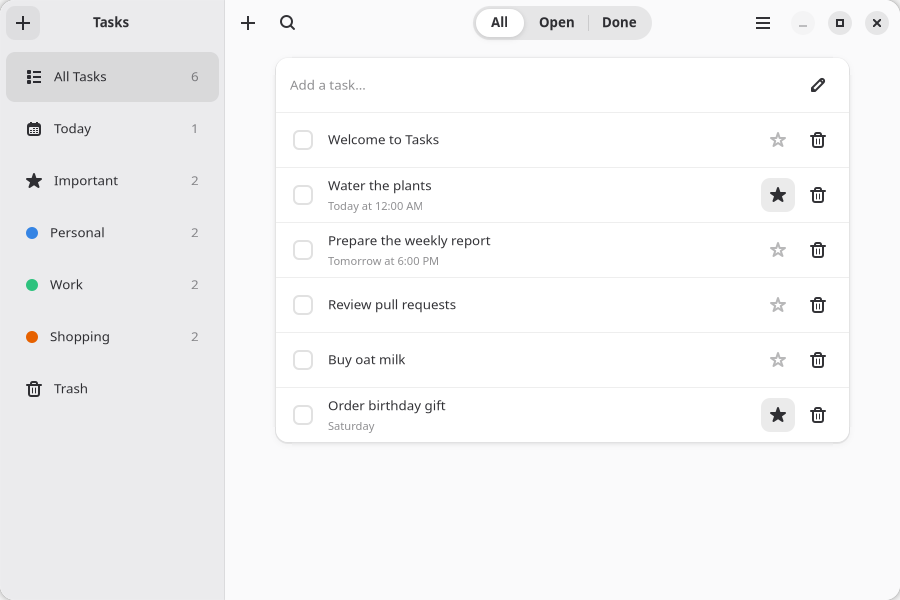
The Tasks app you build in the tutorial.
- Tutorial: build the Tasks app, test it, and package it for distribution.
- Guides: forms, navigation, animation, styling, testing, and deployment.
- API reference: GTKX package exports. Widget props are documented in the generated
.gtkx/reference/in your app. - Examples: a counter, browser, widget showcase, animations, navigation, and component stories.
Contribute
See CONTRIBUTING.md for setup and checks, the Code of Conduct, and the security policy. Architecture and maintainer procedures are in the contributor docs.
Support GTKX
Contribute through Open Collective to help cover recurring costs. Our funding plan explains expenses, fees, and the operating reserve.