data-table-filters
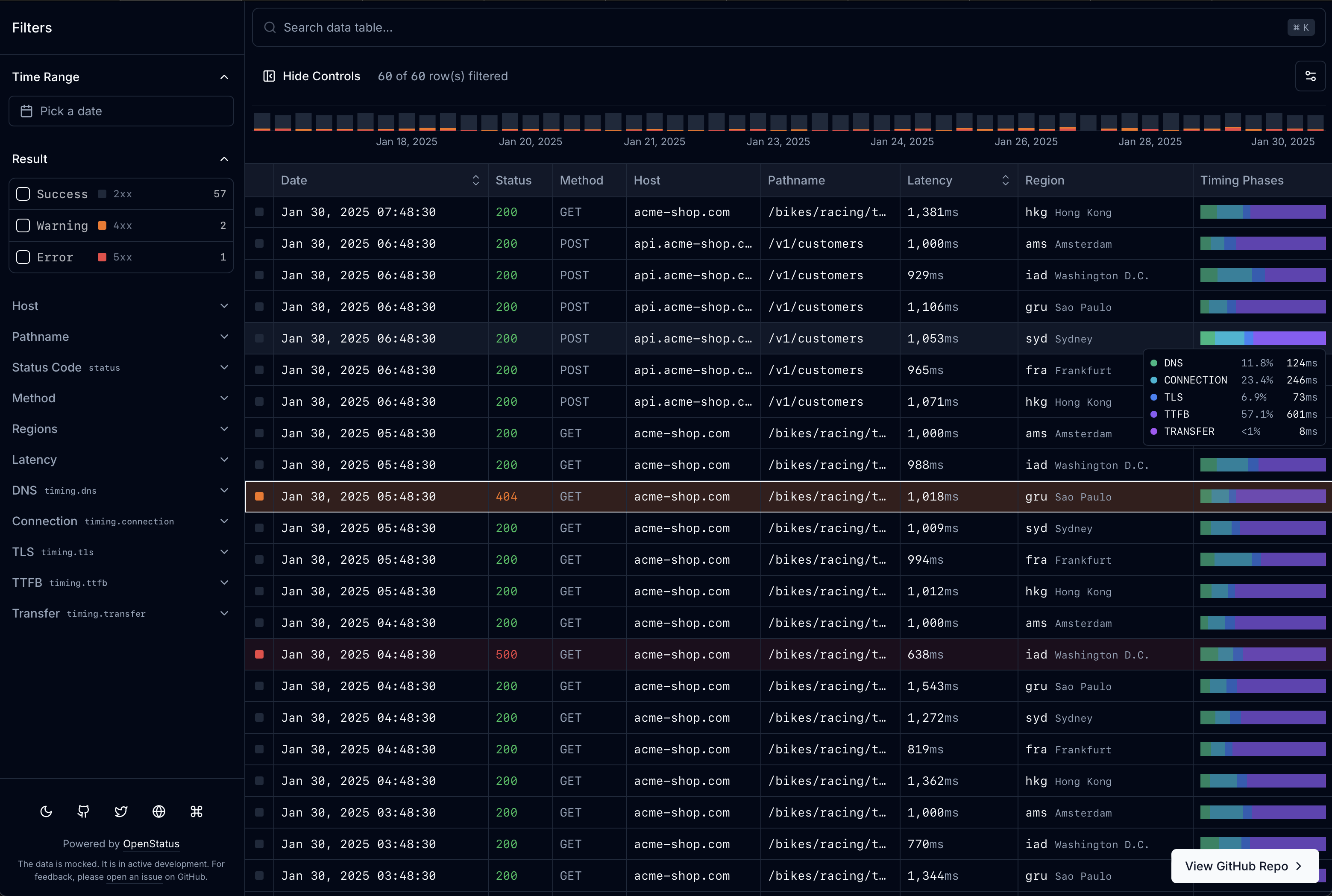
Filterable, infinite-scroll data tables for React and shadcn/ui, installed as source you own.


Website • Documentation • Quick Start • Live Demo

Why data-table-filters?
- One schema, everything generated. A single
createTableSchemadefinition drives the columns, filter controls, row detail sheet, Drizzle route handler, and MCP tool schema. - Filtering that scales. Faceted filters (checkbox, input, slider, timerange), sorting, infinite scroll, and virtualization. With Postgres, filtering, facet counts, and cursor pagination run in SQL.
- You own the code. Blocks install as source through the shadcn CLI, so you change what you need. Works with both Base UI and Radix.
- Bring your own store. Keep filter state in the URL (nuqs), zustand, memory, or your own adapter.
- AI-ready. Natural-language filtering, an MCP endpoint for agents, and a Claude Code plugin that sets the table up for you.
- Tested against the real CLI. CI installs the blocks into fresh Next.js apps and typechecks them on every registry change and nightly.
Quick Start
Prerequisite. Works on either shadcn library: the CLI default, Base UI (
npx shadcn@latest init -d), or Radix (npx shadcn@latest init -b radix -p lyra). CI installs into both and typechecks them on every registry change and nightly.
One command installs the core block and the schema system:
npx shadcn@latest add @data-table-filters/data-table @data-table-filters/data-table-schemaThen render a table from any array of objects — columns, filters, and cell renderers are inferred:
import { DataTableAuto } from "@/components/data-table/data-table-auto";

const data = [
  {
    name: "Alice",
    role: "admin",
    rating: 5,
    created_at: "2026-01-15T10:00:00Z",
  },
  { name: "Bob", role: "user", rating: 3, created_at: "2026-02-20T14:30:00Z" },
];

export default function Page() {
  return <DataTableAuto data={data} />;
}
Starting from nothing? One command creates the Next.js app, initializes shadcn, and installs a working example with every block it needs (add -b radix before -p lyra for Radix). Run cd logs-viewer && pnpm dev and open localhost:3000/example:
pnpm dlx shadcn@latest init @data-table-filters/data-table-example-infinite --name logs-viewer --template next -p lyraRequires pnpm (npm i -g pnpm); npx and npm run dev work the same if you prefer npm.
From create-next-app to a green next build this takes about 30 seconds on a clean machine. See the Quick Start for the full walkthrough, and add any block below as you need it.
Blocks
| Block | Install | What it adds |
|---|---|---|
data-table |
@data-table-filters/data-table |
Core: table engine, store, 4 filter types, memory adapter |
data-table-filter-command |
@data-table-filters/data-table-filter-command |
Command palette with history + keyboard shortcuts |
data-table-cell |
@data-table-filters/data-table-cell |
12 cell renderers (text, code, number, bar, heatmap, gauge, badge, boolean, star, status-code, level-indicator, timestamp) |
data-table-sheet |
@data-table-filters/data-table-sheet |
Row detail side panel |
data-table-nuqs |
@data-table-filters/data-table-nuqs |
nuqs URL state adapter |
data-table-zustand |
@data-table-filters/data-table-zustand |
zustand state adapter |
data-table-schema |
@data-table-filters/data-table-schema |
Declarative schema system with col.* factories |
data-table-drizzle |
@data-table-filters/data-table-drizzle |
Drizzle ORM server-side helpers |
data-table-query |
@data-table-filters/data-table-query |
React Query infinite query integration |
data-table-filter-command-ai |
@data-table-filters/data-table-filter-command-ai |
AI-powered natural language → filter inference |
data-table-mcp |
@data-table-filters/data-table-mcp |
MCP server endpoint for AI agents |
data-table-actions |
@data-table-filters/data-table-actions |
Row and bulk actions rendered from server metadata |
data-table-remote |
@data-table-filters/data-table-remote |
Headless table that renders from an API endpoint's manifest |
data-table-chart |
@data-table-filters/data-table-chart |
Timeline chart over the table: stacked buckets per level, drag to zoom the time filter |
data-table-example-infinite |
@data-table-filters/data-table-example-infinite |
Ready-to-run /example route: schema, mock API, infinite table with URL state |
Blocks install by name from the shadcn registry directory; the JSON form https://data-table.openstatus.dev/r/<block>.json works too.
For AI Agents
Install the plugin in Claude Code:
/plugin marketplace add openstatushq/data-table-filters
/plugin install data-table-filters@openstatus
Or install the skill with any agent that supports the skills CLI:
npx skills add https://github.com/openstatushq/data-table-filters --skill data-table-filtersThen just say "add a filterable data table" — the skill detects your stack, installs the right blocks, generates a schema, and wires everything up.
Or point any MCP client at the docs and let the agent ask them questions —
search_docs, get_doc, list_blocks, get_install_plan:
claude mcp add --transport http data-table-filters https://data-table.openstatus.dev/api/mcpMachine-readable docs, for agents without the skill:
| Endpoint | What it is |
|---|---|
/api/mcp |
These docs as an MCP server (Streamable HTTP) |
/llms.txt |
Index: blocks, install recipes, docs links |
/llms-full.txt |
Every documentation page in one file |
/r/index.md |
Block catalog with install commands and dependencies |
/docs/<page>.md |
Any docs page as raw markdown |
Cursor users can copy .cursor/rules/data-table-filters.mdc into their project; AGENTS.md covers every other agent. See the For AI Agents docs page for the full rundown.
Table Schema
Define your entire table — columns, filters, display, sorting, row details — in one place with createTableSchema and col.* factories.
import {
  col,
  createTableSchema,
  type InferTableType,
} from "@/lib/table-schema";

const LEVELS = ["error", "warn", "info", "debug"] as const;

export const tableSchema = createTableSchema({
  level: col.presets.logLevel(LEVELS),
  date: col.presets.timestamp().label("Date").size(200).sheet(),
  latency: col.presets
    .duration("ms")
    .label("Latency")
    .sortable()
    .size(110)
    .sheet(),
  status: col.presets.httpStatus().label("Status").size(60),
  host: col.string().label("Host").size(125).sheet(),
});

export type ColumnSchema = InferTableType<typeof tableSchema.definition>;
Generators produce everything the table components need from a single schema:
const columns = generateColumns<ColumnSchema>(tableSchema.definition);
const filterFields = generateFilterFields<ColumnSchema>(tableSchema.definition);
const sheetFields = generateSheetFields<ColumnSchema>(tableSchema.definition);
Presets cover common patterns: logLevel, httpStatus, httpMethod, duration, timestamp, traceId, pathname.
Examples
/default— client-side pagination (nuqs or zustand)/infinite— infinite scroll with server-side filtering, live mode, row details/drizzle— Drizzle ORM + Supabase PostgreSQL with cursor-based pagination, faceted search, and live data via Vercel cron/light— OpenStatus Light Viewer (UI forvercel-edge-ping)/builder— interactive schema builder (paste JSON/CSV, live table preview, export TS)
BYOS (Bring Your Own Store)
A pluggable adapter pattern for filter state management. Three built-in adapters:
- nuqs — URL-based state (shareable URLs, browser history)
- zustand — client-side state (existing store integration)
- memory — ephemeral in-memory state (embedded tables, builder)
Or implement the StoreAdapter interface for a custom solution. See the Docs for details.
Built With
- nextjs
- tanstack-query
- tanstack-table
- shadcn/ui
- cmdk
- nuqs
- zustand
- drizzle-orm
- zod
- superjson
- date-fns
- recharts
- dnd-kit
Documentation
Full documentation lives at data-table.openstatus.dev/docs:
Contributing
Contributions are welcome. To run the docs site and demos locally:
pnpm install
pnpm dev
Open localhost:3000. No environment variables are needed for the default examples; the Drizzle example needs DATABASE_URL set to a PostgreSQL connection string.
Before opening a PR, run pnpm format, pnpm lint, pnpm typecheck, and pnpm test. Rebuild the registry with pnpm registry:build if you touched packages/registry/src/.
Built by openstatus
data-table-filters is built and maintained by openstatus, the open-source uptime monitoring and status page platform. It powers the tables in the openstatus dashboard.
Looking for a specific use case, or want to hire us? Write to hire@openstatus.dev or book a call. You can also sponsor openstatus on GitHub.
Credits
- sadmann17 for the dope
<Sortable />component around@dnd-kit(see sortable.sadmn.com) - shelwin_ for the draggable chart inspiration (see zoom-chart-demo.vercel.app)